

A lot of question have been asked and I didn’t have time to record a video tutorial about it yet. But I have capture the screen where you can find sample of information that you may need to fill in when you sign up for Google Adsense.
If you are new to Google Adsense, don’t worry you will find some information related to Adsense on this blog or ask me directly via my twitter account @khmerbird or contact me via Facebook Santel PHIN.
How to start
To start your sign up, click on this link Google Adsense,
Website Information
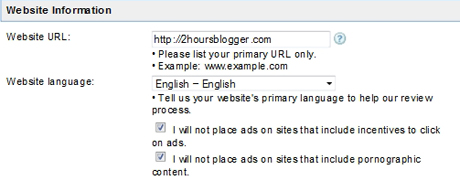
You need to provide your blog address, in my case, I fill in http://2hoursblogger.com or you can simply begin by www.yourblog.com or whatever the url address of your blog.
We don’t have Khmer language to choose yet, I think the best way is to choose English, even your blog is written in Khmer or mix. Then you need to tick the two check box as below:
Contact Information
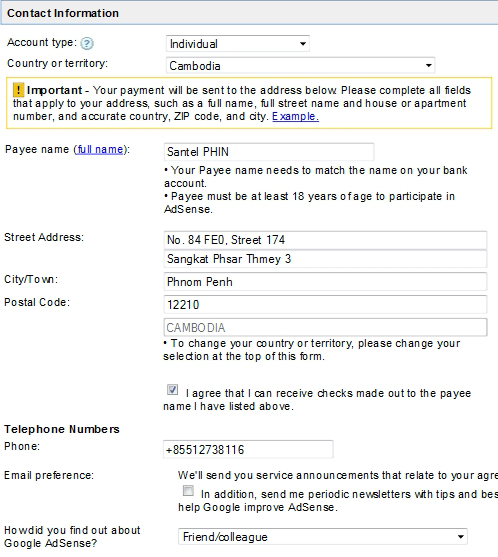
You need to choose Individual account type and choose Cambodia as the country. Then the rest is to fill in your name and address of your house. Some people have difficulty in finding postal code, check out my previous post about Phnom Penh Postal Code, to find the correct code. It is more convenience to rent a Post Box at the post office. This will increase the sureness of recieving the mail and cheque from Google. It is not expensive, the yearly fee if I remember is 10-15 USD.
Policies
The last session, tick the 3 check box to agree to Google Adsense policy and click on button “Submit Information”.

Verify and Choose Email Account
Now you can verify information you have just filled in, any modification needed you just click on back button to correct it. Otherwise you almost finish.
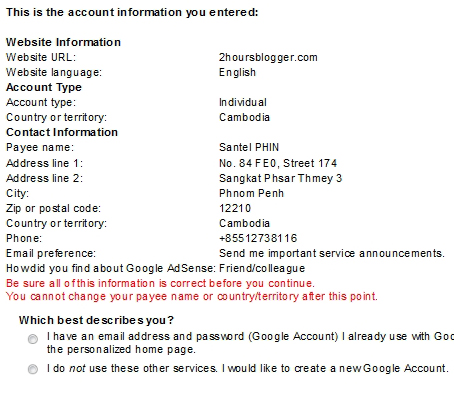
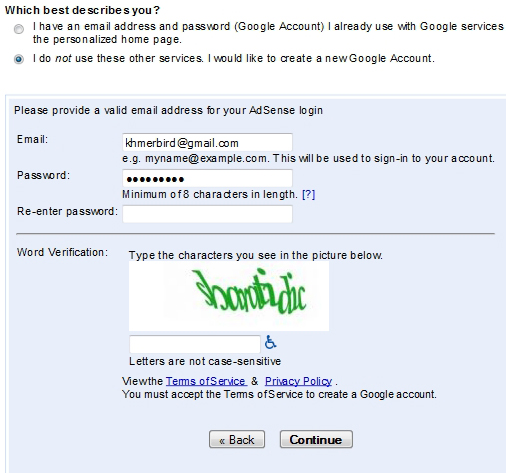
Now if you have already an Gmail account and you want to use this email as a log in for your Google Adsense you can, or if not, you just tick the last option where you can sign up for a new gmail account.
Wait for Approval
After you click on continue, you need to log in into your email and confirm to validate this email account to use for Google Adsense. Then you will need to wait for few days to get answer from Google. This is important to remember that before you decide to put Adsense on your blog, make sure you have good contents and traffic. These two things are the keys to success. I hope you understand what I am talking here.
I do this post because I have been asked by many people to show them how to sign up for Google Adsense, I plan to write more that starting since the beginning about how to create a blog and how to promote it to get traffic. Make sure you subscribe to follow the new contents.
To do so you can check on the right sidebar where you see the word “Subscribe to new posts”, below you can choose to subscribe to the rss feed or better to choose the 2nd option where the new contents will be sent directly to your email.
Good luck for Google Adsense Sign up!
Related posts:
- Video tutorial how to register Google Adsense
- Today is my lucky day – $ 5.71 from Adsense
- USD $485.80 From Google Adsense
Do you like this story?








 Adsense Tips
{ 2 comments… read them below or add one }
Thanks so much for this video.
Bro, I have sth to ask you.
I created google ads account 1 year ago , and now i got 20$ . I got confirmation that my account is now on hold but it seem difficult to get the letter from google ads even i give them my real home address. How can i get google letter ? or i need to rent post box as you said ? Well bro, please kindly share some idea about this please.
I think a lot of people in Cambodia are facing this problem. I will try to contact Google for this issue.
I think it is good to have a post box,
But you still can request Google to send the pin code again, when you ask for the 4th times, Google will allow you to contact their support, then you can have direct mail with them.
Google will send cheque only if amount is 100 USD, good luck for the Adsense,
{ 1 trackback }